
Why the Email Subject Line Matters More Than Ever
Imagine your email inbox today, in 2026. It’s likely full to the brim, right? We get so many emails every day. Because of this, it’s harder than ever for your messages to stand out.

Many emails don’t even get opened. This is a big problem for businesses and anyone trying to share an important message. The first thing people see when an email lands in their inbox is the sender and the email subject line. If that subject line isn’t good, people will often just scroll past or hit delete without even reading what’s inside.
Actually, the subject line is so important that researchers have been studying how to predict email open rates based on it for years, even using smart computer programs to help understand what works best Faculteit Wetenschappen. A strong, clear, and catchy email subject line is the key to getting your email noticed in a crowded digital world. It’s the silent salesperson that convinces someone to click and read your message. Without a good subject line, all the effort you put into writing a great email might be for nothing. The goal is simple: make people want to open your email.
This article is here to help you solve this challenge. We will show you how to write email subject lines that grab attention and get results. We’ll look at new ways to use AI tools and smart strategies to create subject lines that truly connect with your audience. These methods are designed to improve how many people open your emails and how often they respond. Plus, they can even help with bigger goals like getting more sales or sign-ups. Get ready to learn how to make every email count and boost your success in 2026. If you want to dive deeper into how AI is changing business communication, check out our guide on AI for business email in 2026.
Want to stay on top of the latest advancements in AI and technology?
The AI Newsletter Worth Reading
Get clear daily AI updates from The Deep View Newsletter.
How AI Understands What Makes a Subject Line Work
So, how exactly do smart computer programs, or AI, figure out what makes a good email subject line? It’s like AI becomes a super-smart detective for words and feelings. AI uses special computer learning methods, called Machine Learning (ML), to look at tons of past emails and learn what worked and what didn’t. If you want to understand more about these basic ideas, you can check out our guide on artificial intelligence and machine learning fundamentals.
One main way AI helps is through something called Natural Language Processing (NLP) scoring. This means the AI reads and understands the words in an email subject line. It checks for certain patterns, like if it’s asking a question, using exciting words, or creating a sense of urgency. The AI then gives the subject line a "score" to guess how interesting people might find it.
Another big part is engagement prediction. AI models can look at past email campaigns and predict how likely people are to open an email, click on a link inside, or even reply, just by looking at the subject line. This is a very helpful way to guess how well a new email subject line will perform before you even send it Learning to Predict Email Open Rates Using Subject and Sender. Some tools even go further, offering "engagement scoring" that tries to predict different types of reactions for each person Einstein Engagement Scoring for Email Model Card.
AI also helps with personalization. Instead of just trying to make one great email subject line for everyone, AI learns what you like. If you often open emails with numbers in the subject line, AI might suggest that for you. If you respond well to friendly greetings, it will remember that. This is where AI really helps tailor messages to make them feel special to each person.
To do all this, AI looks at many clues. These clues are called "input features" and can include:
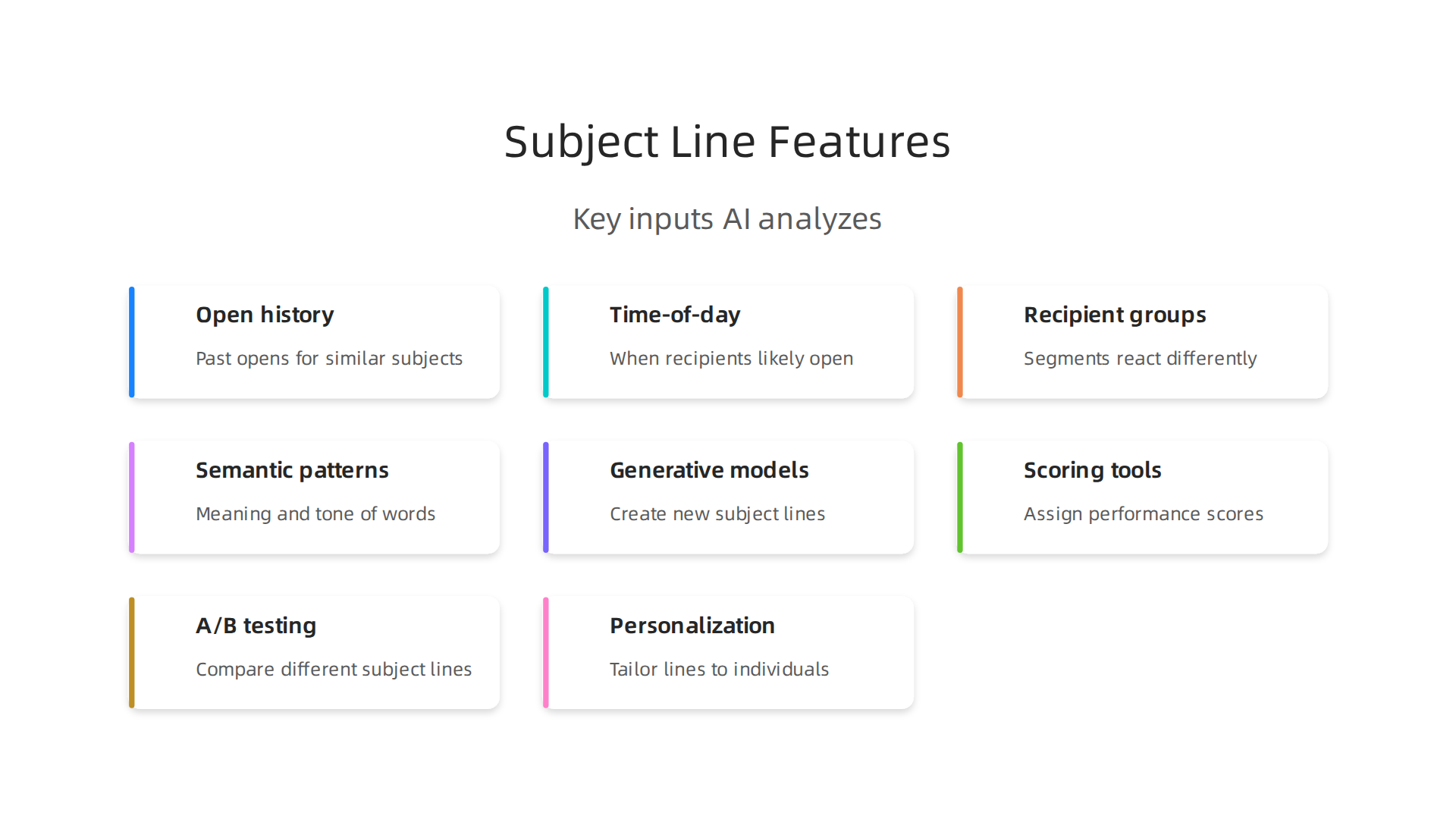
- Open history: Did this person open similar email subject lines before?
- Time-of-day: What time are they most likely to open emails?
- Recipient groups: Different groups of people (like new customers versus old ones) might react differently to the same subject line.
- Semantic patterns: This just means the meaning and feeling of the words in the email subject line. Are they positive, urgent, or informative?
By putting all these pieces together, AI can help you write email subject lines that are much more likely to get noticed and opened.

It can give suggestions, rate your ideas, and even help you create a subject line from scratch, making it much easier to connect with your audience and improve how you write emails. This way, you don’t have to guess or keep asking, "Can you help me write an email that gets opened?" The AI does much of the heavy lifting for you.
With AI doing a lot of the work to help you write email subject lines, you might wonder what these special tools actually look like. Luckily, there are many practical AI tools out there in 2026 that can help you write email subject lines and even test them. These tools fit into a few main types.
First, we have generative models. These are like creative assistants that can come up with new subject lines for you. You just give them a little idea about your email, and they suggest many different options. For example, popular email services like Mailchimp, Klaviyo, HubSpot, and Brevo now have AI tools built right in. You can click a button, tell the AI about your message, and it will give you subject line ideas that are likely to get opened AI Subject Line Optimization: Tools and How to Use Them.
Next, there are scoring and ranking tools. These are like a helpful teacher for your email subject line. You type in your idea, and the AI gives it a score, telling you how good it thinks your subject line is. It can also warn you if it sees words that might make your email go to spam. Many free online tools let you test your subject line and see a preview of how it looks on a phone.
Then, there are subject line A/B testing platforms. These tools help you try out different subject lines to see which one works best. Instead of guessing, you send two or more different subject lines to a small part of your audience. The AI then watches which one gets more opens or clicks and tells you the winner. Many of these tools can connect directly with your email sending software to make this easy.
Finally, some tools focus on personalization engines. We talked about how AI can learn what each person likes. These engines take that idea even further, helping you create subject lines that are just right for each individual reader.
Integrating these tools into your email work doesn’t have to be scary. You can start small. For example, you can try out new AI-suggested subject lines on a tiny group of your audience first, which is like "sandboxing" or testing safely. You can also run "incrementality tests," which means you slowly introduce AI suggestions and see if they make a small but steady improvement over time. This way, you can make sure the AI is really helping your emails perform better. To learn more about how AI can boost your email efforts, check out our guide on AI for Business Email in 2026.
If you want to stay updated on all the smart computer programs helping businesses like yours, there’s an easy way.
Ready for Smarter AI Insights?
Get simple, clear updates on AI every day with The AI Newsletter Worth Reading.
When you use AI tools to create different email subject lines, the next big step is to test them. This is where A/B testing comes in. It helps you see which subject line really works best with your audience. To get good results from these tests, especially when comparing an AI-generated email subject line to one you wrote yourself, you need to follow some simple rules.
Key Rules for Good A/B Tests
Think of these as the main ideas that make your tests fair and useful:
- Random People: You need to make sure the people getting each different email subject line are chosen completely by chance. This is called randomization. If you don’t do this, you might accidentally send the "good" subject line to people who are already more likely to open emails, which would make your test unfair.
- Enough People: This is super important. You need a certain number of people in each test group to make sure your results are true and not just luck. Some experts say you need at least 200 people for simple open rate tests, but many recommend 1,000 people or more for each version of your email to get reliable results A/B testing for email campaigns: The complete guide for 2026. For testing email subject lines, some suggest aiming for 5,000 sends per variant, or even 10,000 to 20,000 recipients per version for very clear results How to A/B Test Email Campaigns Like a Pro (2026). The exact number depends on how big of a difference you expect to see and how confident you want to be in your answer.
- Holdout Groups: Sometimes, you might keep a small group of people out of the test altogether. This helps you compare how your tested subject lines perform against a group that didn’t get any special treatment.
- Don’t Look Too Soon: It’s tempting to check your test results right away, but you should wait until enough time has passed and enough people have seen the email. This helps you avoid something called "peeking bias," where you might stop the test early and get a wrong idea about which subject line is winning. Many suggest running tests for at least one full day The Golden Ratio for Effective Email A/B Split Testing.
Your Checklist for A/B Testing Email Subject Lines
Here’s a simple guide to running your own tests:
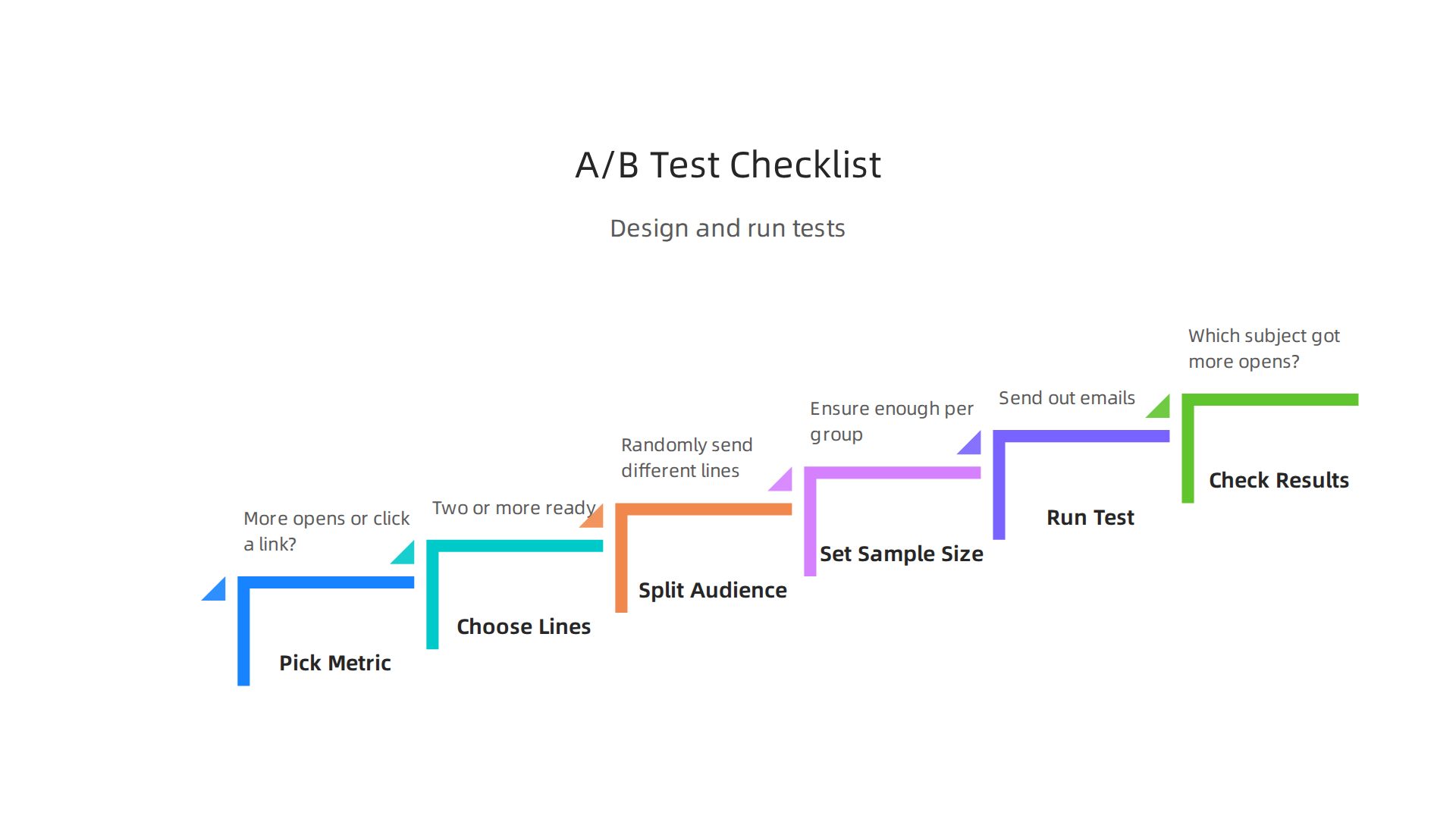
- Pick What You Want to Measure: Do you want more people to open your email, or click a link inside? Decide your main goal first.
- Choose Your Subject Lines: Get two or more email subject lines ready. One could be from your AI tool, and another could be one you wrote.
- Split Your Audience: Use your email program to randomly send different subject lines to different groups of people. For example, send Subject Line A to Group 1, and Subject Line B to Group 2.
- Set the Right Number: Make sure each group has enough people, as discussed above, and that the test runs for enough time to get clear results.
- Run the Test: Send out your emails!
- Check the Results: After the test period is over, look at your results. Which email subject line got more opens or clicks? That’s your winner. Use this information to help you write email messages and improve your future emails.
By carefully designing and running these tests, you can see how AI helps you write email content better and make sure your email subject lines are as effective as possible.

Learning how to master AI in your email marketing can truly boost your success in 2026. If you want to dive deeper into improving your email strategy, consider exploring resources on how to master AI email marketing templates for 2026 success. You’ll find many ways that AI can help you craft not just subject lines, but your entire message, helping you to decide how to close an email effectively and get the best response.
Learning how to use AI to improve your emails, like writing a great email subject line, is just one part of making your email strategy better. Another big step is making your emails special for each person. This is called personalization.
Personalization at Scale: Balancing Relevance and Privacy
Making emails personal means sending messages that feel like they were written just for one person. This makes people more likely to open your email, read it, and do what you ask, like click a link. When you write an email that truly speaks to someone, it stands out.
Different Ways to Personalize Emails
There are a few main ways businesses use AI to make emails personal:
- Rule-Based Personalization: This is like setting up simple "if-then" rules. For example, "If someone bought a blue shirt, then send them an email about new blue pants." It’s straightforward and easy to understand, but not very smart.
- Model-Driven Personalization (Using AI): This is where AI really helps. Instead of simple rules, AI uses what it has learned from lots of data to guess what each person might like next. It can suggest a product, or even help you write an email or craft a unique email subject line that’s perfect for that person. This approach can help you decide how to close an email in a way that resonates with the reader, making your messages much more effective.
- Contextual or Signal-Based Personalization: This method uses what someone is doing right now. For example, if someone just looked at a new phone on your website, you might immediately send them an email about that phone or similar ones. The "signal" is their recent action.
These advanced ways of personalizing can make your messages very powerful, but they also bring up important questions about keeping people’s information safe.
Keeping Personalization Private
As we use more AI to help us write emails and make them personal, we must also think about privacy. People want emails that are relevant to them, but they also want their personal information to be respected. This means businesses need to:
- Ask for Permission: Always get clear "yes" from people before collecting and using their data for personalization. This is called consent.
- Use Data Wisely: Only use the information that is truly needed to make an email better. Don’t collect or store extra data that isn’t necessary.
- Follow the Rules: In 2026, there are many rules and laws about data privacy. Businesses must make sure their personalization systems follow all these regulations to protect customer information.
- Be Clear: Tell people how you use their data. This builds trust and helps them feel more comfortable with personalized messages.
By balancing smart personalization with strong privacy practices, you can make your emails more effective and keep your customers happy. Using AI for business email in 2026 can greatly boost productivity and streamline operations, but always with respect for the user.
To stay on top of all the latest AI developments, including ethical AI use and advanced personalization techniques, consider subscribing to The AI Newsletter Worth Reading.
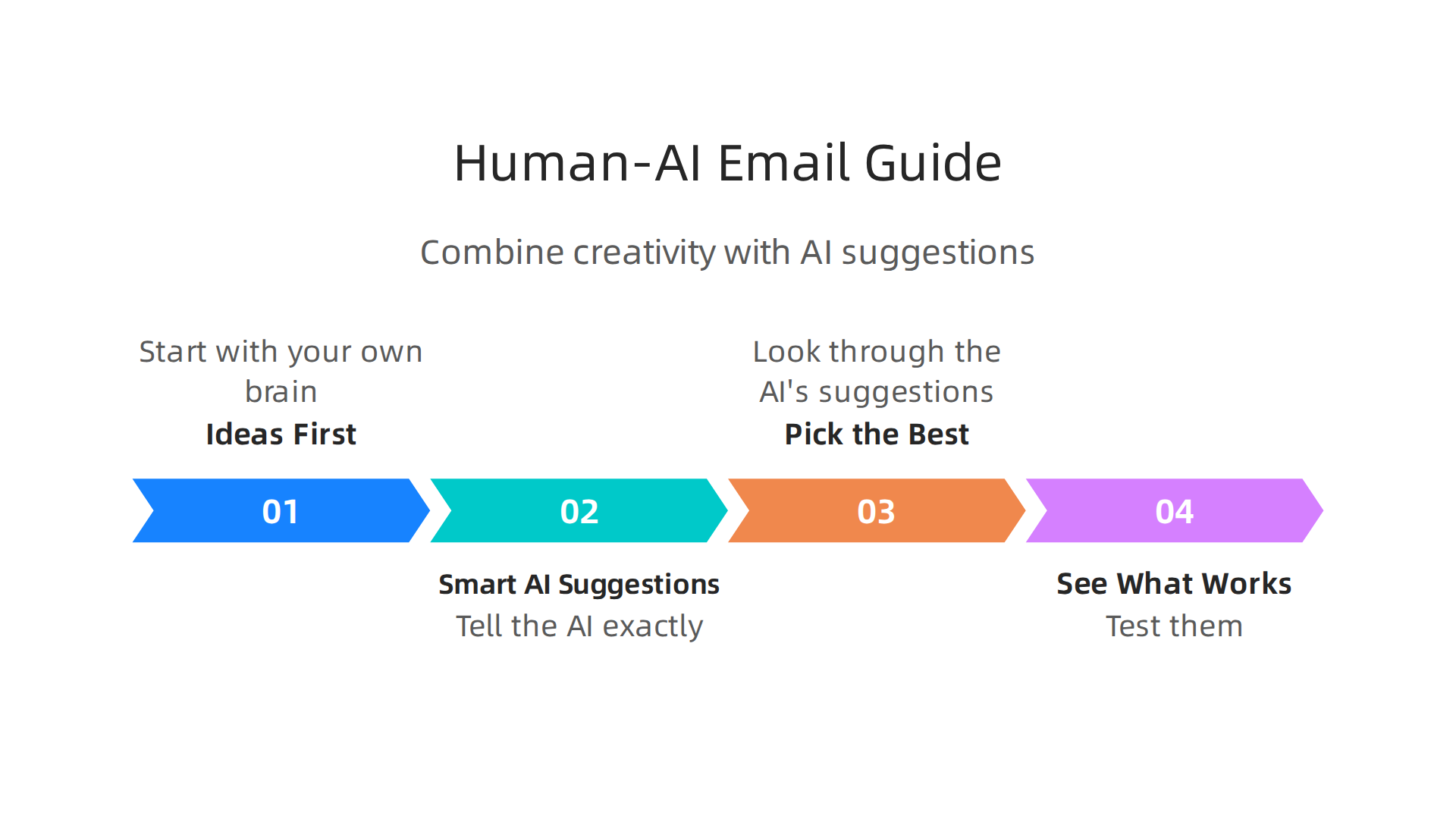
To write email messages that truly connect with people, you need a good mix of human ideas and smart AI help. It’s about knowing what to say and how to say it, especially in key parts like the email subject line or how to close an email. This way, AI doesn’t take over; it helps you do your best work.
Here is a simple way to combine your skills with AI to make better emails:
1. Ideas First (Ideation)
Start with your own brain. What do you want to tell your readers? What is the main point of your email? Think about your audience and what they care about. This human touch is very important because AI doesn’t understand feelings or your brand’s unique voice as well as you do. You can use AI to help you brainstorm more ideas once you have a clear goal. For example, you might ask AI to "help me write an email by giving me 10 different ways to announce a new product."
2. Smart AI Suggestions (Constrained Generation)
Once you have a few core ideas, tell the AI exactly what you need. This is where "prompts" and "templates" come in handy. Instead of just saying "write an email," give the AI rules. For example, you could say: "Write 5 catchy email subject lines for a sale. Make them short, use emojis, and create a sense of urgency." Many email tools in 2026, like Mailchimp and Klaviyo, have AI features built-in that can create subject lines for you based on simple descriptions. These tools are designed to help you write email parts more effectively.
3. Pick the Best (Editorial Filtering)
AI can give you many options, but not all of them will be perfect. Your job is to look through the AI’s suggestions and pick the best ones. Does the email subject line sound like your brand? Is it clear and exciting? Does it fit what you want to say in the email? Sometimes, you might need to tweak a few words here and there to make it just right. Your human judgment is key here.
4. See What Works (A/B Validation)
After you’ve picked the best options, it’s time to test them. This is called A/B testing. You send slightly different versions of your email to small groups of people to see which one performs better. For example, you might test two different email subject lines to see which one gets more opens. For a reliable test, especially for an email subject line, you often need to send each version to many people. Some experts suggest sending at least 5,000 emails per variant to get meaningful results for subject line tests in 2026, according to studies on email A/B testing. This helps you learn what your audience likes best.
By following these steps, you use AI to boost your creativity and make your emails much more effective. It’s about working together with the AI, not letting it do everything on its own. If you want to dive deeper into how AI is changing business communication, learn how AI for business email in 2026 can greatly boost productivity and streamline operations.
Using AI to help you write email parts is smart, but it also has its own set of challenges. You need to be careful to avoid problems like biases or emails that get flagged as spam.
Avoiding Common Pitfalls and Biases in AI-Generated Subject Lines
When you ask AI to help you write an email subject line, remember that AI is only as good as the information it learns from. If the training data has problems, the AI might make mistakes too.
Watch Out for Bias and Insensitivity
One big issue is "bias amplification." This means the AI might accidentally use unfair ideas or words it learned from past data. This can lead to email subject lines that don’t treat all people fairly or that don’t fit your brand’s message. Such issues can damage trust with your customers and even cause legal problems in 2026, as discussed in ethical guides for AI in marketing and brand safety reports. AI might not understand different cultures or how certain words feel to certain groups of people. This can make your emails seem out of touch or even rude. It is very important to have real people check what the AI creates. You can even ask the AI, "Do you see any biases or assumptions in the text above?" before you use it, as experts suggest human vetting for AI copy AI Copy Isn’t Neutral: What Copywriters Need to Know.

Steering Clear of Spam Traps
Another common problem is creating email subject lines that look like spam. In 2026, email filters are very smart. They look at many things, not just a few keywords. They check who is sending the email, how often people open your emails, and how the message is built. If your email subject line is misleading, too pushy, or uses words often found in spam, your email might go straight to the junk folder Subject Lines That Trigger Spam Filters in 2026. This means your message will never even be seen, no matter how good the rest of your email is. In fact, AI-generated emails can sometimes be more likely to be flagged as spam compared to human-written ones, affecting how many people actually receive your messages AI SDR Real Performance: 100K Email Analysis 2026.
Avoiding Operational Mistakes
To use AI well, you also need to avoid some common mistakes:
- Too much personalization: Sometimes, AI can make an email subject line or greeting so personal that it feels strange or even creepy to the reader.
- Setting it and forgetting it: Don’t just let AI send emails on its own without checking. You need to watch how your AI-powered emails are doing and make changes often.
- Ignoring long-term effects: If AI-generated emails keep getting ignored or marked as spam, it can hurt your sender’s reputation over time. This makes it harder for all your future emails to reach people’s inboxes.
It’s clear that AI can help you write email content, but human oversight is key to making sure your email subject line and the rest of your message are effective and trustworthy. To learn more about how to make sure AI output still sounds like you, check out our guide on how to humanize AI text.
Staying updated on the latest AI trends and best practices is crucial for using these tools safely and effectively.
Get clear daily AI updates from The AI Newsletter Worth Reading.
After making sure your AI-generated email subject line and message avoid problems, the next important step is to watch what happens after you send them. It’s not enough to just see if people open your emails. You need to look at how well your emails are really doing over a longer time.
Measuring Long-Term Impact: Reputation, Deliverability, and Lifecycle Metrics
When you use AI to help you write email content, it changes how you should measure success. Just looking at how many people open your email right away, or how many click a link, is only part of the story. You need to think about the bigger picture for your brand’s health and how much your customers like you.
Beyond Just Opens: Checking Deliverability
"Deliverability" is a big word that simply means if your emails actually get to people’s inboxes instead of their spam folders. Modern email systems in 2026 are very smart. They look at more than just the email subject line or what words are inside the email. They check things like if people usually open your emails, if they mark them as spam, or if they unsubscribe. All these actions affect your "sender reputation." If your sender reputation is bad, your emails might not even get seen, no matter how good they are.
AI-generated email content can actually hurt your ability to deliver emails if it makes people ignore, delete, or mark your messages as spam Can AI-generated email content hurt your deliverability?. So, to truly know how well your AI is helping you write email messages, you need to track more than just open rates. You should pay close attention to:
- Unsubscribe rates: How many people stop wanting your emails.
- Spam complaints: How many people tell their email provider your email is spam.
- Bounce rates: How many emails could not be delivered at all.
These numbers give you a real idea of your deliverability. Experts say that email deliverability in 2026 depends on many factors, including how your messages are built and recipient behavior Email Deliverability in 2026: What Enterprise Marketing Teams Must …. If you want to dive deeper into how AI can boost your email efforts, check out our guide on AI for business email in 2026.
Looking at the Whole Customer Journey
Beyond deliverability, you also need to track "downstream conversions" and "customer lifetime value."
- Downstream conversions means looking at what people do after they open your email. Do they visit your website? Do they buy something? Do they sign up for a service?
- Customer lifetime value looks at how much money a customer spends with your business over the entire time they are a customer.
If your AI helps you write email subject lines that get more people to open emails, but those emails don’t lead to actual sales or happy, long-term customers, then it’s not truly helping your business. Misleading email subject lines can even cause legal issues and definitely hurt your deliverability The Dangers of Generative AI in Email Marketing.
Setting Up Dashboards to Watch Your Progress
To keep track of all these things, you should set up dashboards. These are like easy-to-read reports that show you how your emails are doing. Your dashboards should show:
- Short-term wins, like high open rates and clicks.
- Long-term risks, like rising unsubscribe rates or spam complaints.
- How your emails lead to bigger goals, like sales and customer loyalty.
By watching these numbers, you can make smart changes to how you use AI to craft your messages. This helps make sure that every email subject line you send builds a good relationship with your audience and helps your business grow. To learn how to make the most of AI in your campaigns, exploring master AI email marketing templates for 2026 success can be a great next step.
Using AI to make your emails better, from the first email subject line to how to close an email, is not just about the tools themselves. It’s also about having the right people and clear rules in place. To truly get the most out of AI for your emails, your company needs to be set up in a smart way. This means knowing who does what, what skills they need, and how everyone works together.
Organizational Readiness: Teams, Skills, and Processes for AI-Driven Email
Bringing AI into your email strategy means thinking about your team. You’ll need people with different skills to make sure everything runs smoothly and safely.
Who You Need on Your Team
- Data Scientists: These are the experts who look at all the numbers. They help understand why some AI-generated
email subject lineideas work better than others, and how to improve the AI models over time. - Deliverability Engineers: Their job is super important. They make sure your emails actually land in people’s inboxes and not in spam folders. They’ll watch how AI content affects your sender reputation.
- Content Strategists: These folks guide the AI. They make sure that when you
write emailcontent with AI, it still sounds like your brand. They help define the voice and tone, ensuring the AI canhelp me write an emailthat connects with your audience. - Product Managers: They oversee the AI tools themselves. They make sure the tools fit into your company’s workflow and help your team reach its goals.
Working together is key. These different roles need to talk to each other and share what they learn. This way, everyone can make sure the AI is used in the best way possible for all your email needs.
Bringing in New AI Tools: A Checklist
When you decide to use a new AI tool for your emails, you can’t just pick the first one you see. You need a clear plan for how to choose, check, and use it. This helps keep your data safe and makes sure the tool actually helps your business.
Here’s a simple checklist for bringing in new AI tools:
- Start with Research: Before buying, really dig into what the tool does. See if it fits your specific needs, like helping with your
email subject lineor full email drafts. - Security Review: This is super important. Make sure the AI vendor can protect your information. They should have security certifications like SOC 2 Type II or ISO 27001, which show they have good security practices Enterprise AI in Digital Marketing: Security Governance and Procurement Checklist for Specialists. Experts suggest looking for a clear data processing agreement too.
- Understand Data Handling: Ask how the AI tool uses your data. Does it train its AI with your company’s private emails? You want to be sure your information stays private.
- Set Clear Rules (Governance): You need to have clear rules about how your team will use AI. This includes who is in charge of overseeing AI tools and making sure they are used fairly and ethically [ISO 27001:2022 — AI governance checklist & IT procurement, Clause 5: Leadership (2/7)]. Establishing strong leadership for this from the start is very important My AI Governance Framework for Procurement.
- Pilot and Test: Don’t roll out a new AI tool to everyone at once. Try it with a small group first. See how it works, what problems come up, and how it helps your team create better emails.
- Ongoing Monitoring: Even after a tool is in use, keep watching it. Make sure it’s still doing what you need and that it’s safe. A good AI vendor will also have an approval checklist to help you make these choices AI Vendor & Tool Approval Checklist 2026.
By following these steps, you can make sure your company is ready to use AI in a smart and safe way. This will help your team write email messages that perform well, build trust with your customers, and help your business grow. If you’re looking to dive deeper into the world of AI companies and how to evaluate them, you can always learn more about how to Identify, Evaluate, and Track Top AI Companies.
Staying informed about the fast-changing world of AI is crucial for any professional.
Get clear daily AI updates from The AI Newsletter Worth Reading.
Summary
This article explains why the email subject line remains the single most important factor for getting messages opened in today’s crowded inboxes and shows how AI can help you write better ones. It covers how machine learning and NLP score subject lines, predict engagement, and enable personalization at scale, plus the practical types of AI tools available—from generative suggestion engines to scoring, A/B testing, and personalization platforms. You’ll learn concrete rules for fair A/B tests, a simple editorial workflow that mixes human judgment and constrained AI prompts, and how to balance relevance with privacy and legal obligations. The piece also warns about common AI pitfalls—bias, spam triggers, and operational errors—and explains which metrics to track beyond opens (deliverability, spam complaints, unsubscribes, and downstream conversions). Finally, it lays out team roles and a vendor checklist for safely adopting AI so you can improve open rates without risking reputation or compliance. After reading, you’ll know how to start using AI to craft, test, and measure subject lines that actually help your business meet long-term goals.