
Why AI for Email Is a Strategic Priority in 2026
Even in 2026, email remains a core part of how businesses get things done. It’s the main way many people talk to customers, partners, and their own teams every single day. Keeping up with all these important messages, answering them fast, and making sure they sound just right can take a lot of time. This is why using AI for business email isn’t just a nice-to-have, it’s becoming a very smart move for companies today.
AI helps people handle their business email in many powerful ways. These tools can make work easier, faster, and more effective. Many businesses are now using AI to get more done. In fact, a report shares that by the end of 2026, AI tools are expected to help with or fully manage 30% of incoming business emails.
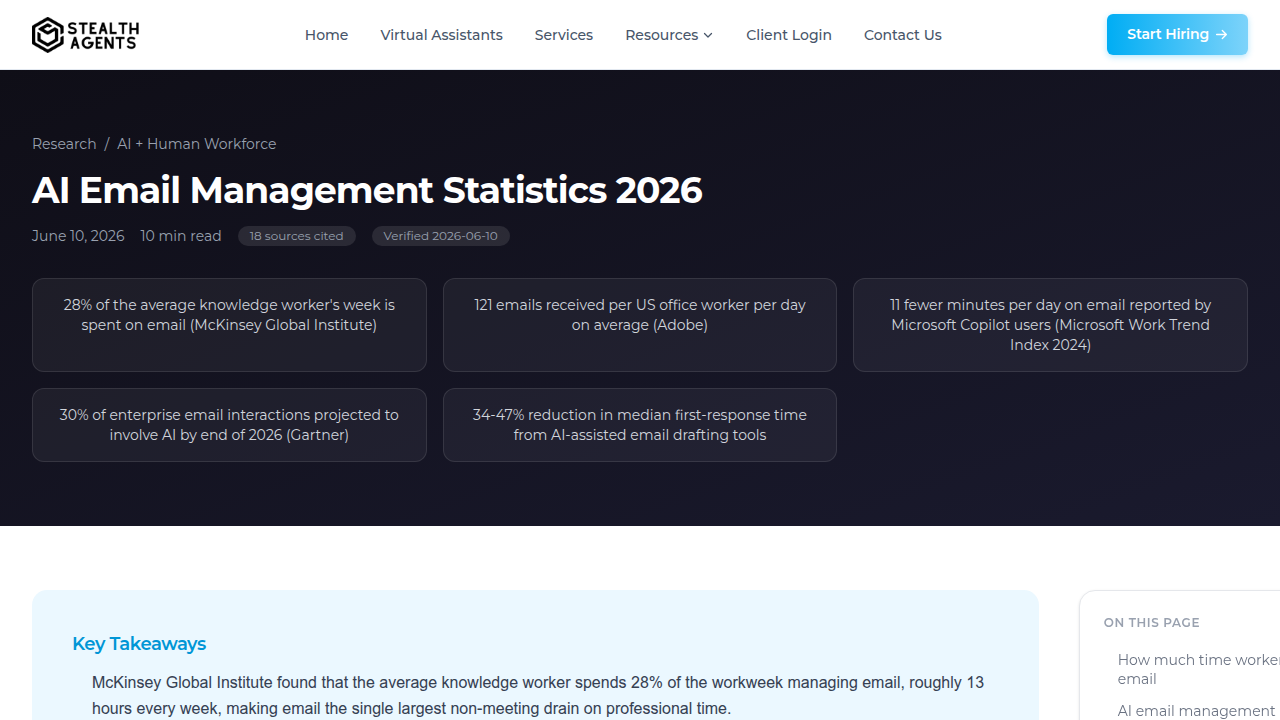
This is a big jump from just a few years ago, thanks to new AI tools built into popular email programs AI Email Management Statistics 2026.
Here are the main ways AI helps with your emails:
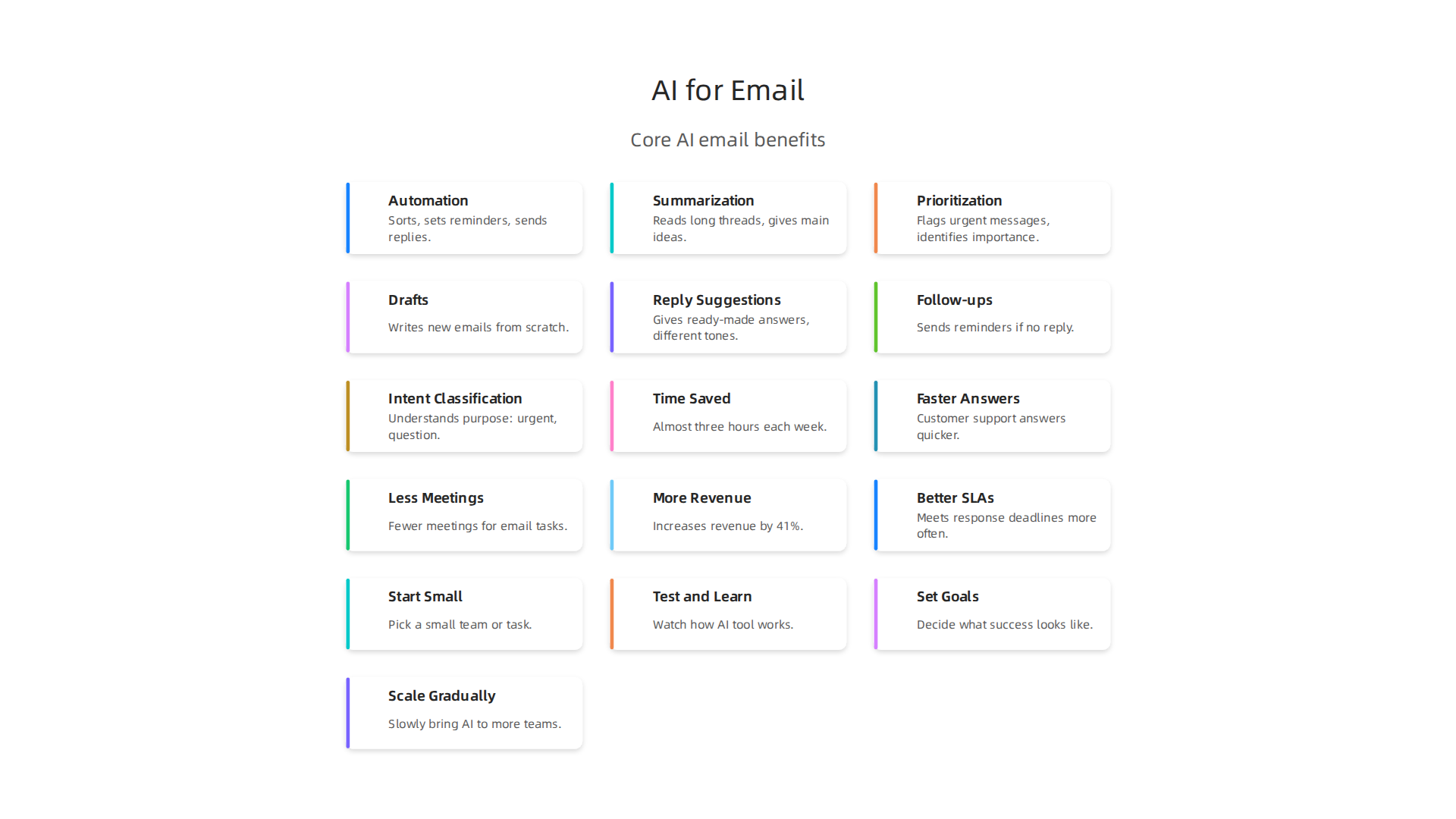
- Automation: AI can do many email tasks for you without you lifting a finger. It can sort your emails into different folders, set up automatic reminders, or even send out simple, common replies. This means less time spent on routine tasks for your business email.
- Summarization: Imagine getting a super long email thread. AI can quickly read through it and give you the main ideas in just a few sentences. This helps you understand important messages much faster and saves you from reading every word.
- Prioritization: AI can look at all your incoming messages and tell you which ones are most important. It helps you see what needs your attention right away, so you don’t miss urgent requests or opportunities.
Beyond these helpers, some AI tools can act as an ai email writer free or an ai letter writer free online. They can help you write emails from scratch, suggest better words, or make sure your messages are clear and polite. Using AI for email writing means you can send out professional communications more quickly and with fewer mistakes.
So, in 2026, using AI for email isn’t just about saving a little time. It’s about working smarter and keeping your business running smoothly.

If you want to keep up with how AI is changing business, consider getting regular updates. Get clear daily AI updates from The Deep View Newsletter.
Top Business Use Cases for AI-Powered Email
Using AI for your business email is a smart choice for many companies in 2026. It’s not just about making small tasks easier. It’s about changing how different parts of a business work, making them faster and better. Actually, many professionals now use AI in their daily work, with numbers nearly doubling in the past year 2026 AI in Professional Services Report.
Let’s look at the main ways AI helps with email:
- Automated Drafting and Writing: Imagine you need to send a lot of similar emails, like answering common customer questions or sending follow-up messages. AI can help you write these emails quickly. It learns from your past messages and can suggest whole sentences or even full replies. This is a huge time-saver and makes sure your business email is always clear and professional. You can think of it as having a smart helper who can write for you.
- Faster Summarization: We all get long email chains. AI tools can read these long messages and give you the main points in just a few lines. This means you don’t have to spend a lot of time reading through everything. You can quickly understand what’s important and what actions you need to take.
- Smart Prioritization: Your inbox can fill up fast. AI helps by looking at all your incoming mail and telling you which ones are most important. It learns what matters to you and flags urgent requests or big opportunities. This way, you focus on what needs your attention right away and don’t miss anything critical.
- Easy Meeting Coordination: Setting up meetings can be tricky with many people. AI can look at everyone’s calendars, suggest the best times, and even send out invites. If someone can’t make it, AI can help reschedule. This takes away the back-and-forth emails that often happen when trying to find a meeting time.
Who Benefits Most From AI Email Tools?
Different jobs get a big boost from AI in email:
- Sales Teams: They can send personalized emails faster, follow up with more potential customers, and spend more time selling instead of writing.
- Customer Support: AI helps them answer common questions quickly, meaning customers get help faster and are happier. It also frees up support staff to handle harder problems.
- Executives and Managers: These leaders often have very busy inboxes. AI helps them quickly get the gist of important messages and decide what needs their attention, saving them valuable time.
When companies use AI for email, they often see improvements in things like how fast they reply to emails, how many emails they can send, and how happy their customers are. These are called Key Performance Indicators, or KPIs. Using AI helps teams improve these numbers. If you’re looking to understand more about these smart tools, a good place to start is an AI Tools Guide Evaluate Implement and Invest Smartly in 2026.
When we talk about using AI for business email, it’s helpful to look closely at the special features that make it so powerful. These aren’t just minor helpers. They are smart tools that truly change how emails get done every day. In 2026, many companies are finding these tools essential, with some popular options like Microsoft Copilot and Gmail’s Gemini providing native email drafting and summarization capabilities Best AI Email Tools in 2026: What’s Actually Worth Using.
Here are the top AI features that are changing business email:
Smart AI Features for Your Emails
| AI Feature | What It Does | How It Helps Your Business Email |
|---|---|---|
| Smart Draft Generation | Writes new emails from scratch based on a few simple ideas or keywords. | Saves a lot of time by handling the first draft. It’s like having an [ai email writer free] on demand. |
| Reply Suggestions | Gives you ready-made answers to incoming messages, often with different tones to choose from. | Speeds up how fast you reply to customers and partners, making communication smoother. |
| Digest/Summarization | Reads long email threads and gives you the main points in a short, easy-to-read summary. | You quickly grasp what’s important without reading every word, great for busy inboxes. |
| Automated Follow-ups | Schedules and sends reminder emails if someone hasn’t replied or completed a task. | Makes sure important conversations don’t get lost and actions are taken on time. |
| Intent Classification | Understands the purpose of an email (e.g., "urgent," "question," "request"). | Helps you focus on the most important messages first, improving how you handle your inbox. |
These features work together to make your business email smarter. For instance, an [ai letter writer free online] can help you craft a perfect opening, then reply suggestions can keep the conversation going smoothly.
How AI Email Features Connect with Other Tools
These smart email features don’t just sit alone. They often connect with other important business tools to make everything work better together.
- CRM (Customer Relationship Management): When an AI drafts an email to a customer, it can pull details from your CRM. This makes the email very personal. It can also save the sent email back into the CRM, so everyone on the team knows what was said.
- Ticketing Systems: For customer support, AI can read an incoming email, figure out what the customer needs (intent classification), and even create a new ticket in your support system. This makes sure no customer question is missed.
- Calendaring Tools: As mentioned before, AI can use its features to suggest meeting times and send invites, all by checking everyone’s calendars. This takes away the back-and-forth emails when trying to schedule something.
Things to Think About for Your Company
Before bringing these AI tools into your business email system, there are some important things to consider:
- Security: How safe is your email data with the AI tool? Make sure the tool has strong security to protect your company’s private information.
- Ease of Setup: Is it easy to add the AI tool to your current email system, like Outlook or Gmail? You want something that works smoothly without a lot of trouble.
- Compatibility: Does the AI tool work well with all the other software your company uses, like your CRM or ticketing system? Good tools fit right in.
Choosing the right features and making sure they fit your company’s needs can really boost how well your team handles their emails. To stay on top of all the new AI trends and tools that can help your business, you’ll need the best information.
Get clear daily AI updates from The AI Newsletter Worth Reading.
Choosing the right AI features and making sure they fit your company’s needs can really boost how well your team handles their emails. In 2026, many companies are already seeing big benefits from these tools, changing how they manage their business email.
How Companies Are Adopting AI Email: Market Trends & Segments
More and more businesses are using AI for email writing and management. This isn’t just for big companies anymore.

Small, medium, and large businesses are all finding ways to use these smart tools.
For big companies, called "enterprises," AI is a major player. Reports show that a huge number of large enterprises, around 87%, now have at least one AI system running. This includes tools that help with business email. Even small and medium-sized businesses (SMBs) are stepping up, with over half of them now using AI tools too, according to a 2026 report on AI marketing. Experts predict that by the end of 2026, AI tools will help with or fully manage nearly a third of all inbound emails for large companies, which is a big jump from just a few years ago AI Email Management Statistics 2026.
Companies usually start using AI email tools in small steps. They might begin with one team trying out smart draft generation, or a customer service department testing reply suggestions. Once they see how well it works and how much time it saves, they slowly bring these tools to more teams. This way, everyone gets used to the new technology little by little. This careful rollout helps companies make sure the AI tools fit their needs without causing too much change at once.
Different types of businesses use AI email features for different tasks. For example:
- Customer Support Teams: They often use AI for email writing to quickly answer common questions or summarize long customer messages. This helps them respond faster and keep customers happy.
- Sales and Marketing: These teams use AI to draft personalized emails for many customers at once. An [ai email writer free] can help them create compelling messages for different groups. They also use AI to keep track of conversations and send automated follow-ups.
- Executive Assistants: They might use AI to manage busy inboxes, prioritize urgent messages, or even act as an [ai letter writer free online] to help draft formal communications quickly.
- Professional Services: Industries like healthcare, finance, and technology are seeing fast growth in adopting AI. While finance and professional services already use a lot of AI, other areas like technology, healthcare, and manufacturing are quickly catching up in how fast they are adopting these new tools The Enterprise AI Playbook – Stanford Digital Economy Lab.
The way AI is being used in business email shows that it’s becoming a standard part of how companies operate. It helps them work smarter, not harder, across many different roles and industries.
Now that companies are using AI tools for their emails, it’s really important to know if these tools are actually helping. Just putting them in place isn’t enough. Businesses need to measure if they are truly getting their money’s worth and making work easier. This is called figuring out the "Return on Investment" or ROI.
Practical Ways to See How AI Email Helps
When a company uses AI for business email, there are clear things they can track to see if it’s working:
- Time Saved by Each Person: One of the biggest wins from AI email tools is saving time. For example, a study showed that people using AI assistants for email tasks saved almost three hours each week. This is a big help, freeing up time for other important work.
- Faster Answers: For teams like customer support, how fast they reply matters a lot. AI can help them answer customer questions much quicker. This means customers are happier because they don’t have to wait as long.
- Less Time in Meetings: If people can get their work done faster with AI, they might need fewer meetings to discuss email tasks or project updates. This saves time for everyone.
- More Money for Sales: For sales and marketing teams, AI email can lead to more sales. Using AI to send smart emails can help increase how much money a company makes. Some research shows that AI-powered email programs can bring in 41% more money than old ways of sending emails AI Email Marketing 2026: 41% Revenue Increase Guide.
- Better Customer Service Agreements: Many companies have rules about how fast they must answer customers. These are called Service Level Agreements (SLAs). AI helps teams meet these deadlines more often.
How to Measure If AI Email Is Making a Difference
To truly know if AI email tools are helping, companies use different ways to check:
- Before-and-After Checks: This is like taking a "before" picture and an "after" picture. Companies look at how long tasks took or how many emails were sent before using AI, and then compare it to after using AI. This simple comparison can show big changes.
- A/B Tests: Sometimes, a company will have one group of employees use the new AI tools, while another similar group does not. Then, they compare the results to see which group was more productive or saved more time. This helps them see the direct impact of the AI.
- Asking Employees: Companies can also give out surveys to their employees. They ask questions about how much time they save, if their work is easier, or if they feel more productive with the AI tools. This gives a direct look at how people feel about the changes.
- Tracking Key Numbers: Keeping a close eye on the numbers mentioned above (like response times, sales figures, and time spent on email) over time can clearly show if the AI is working. For example, some studies show that for every dollar spent on AI tools in a big company, they get about $4.40 back AI Productivity Statistics 2026 — Research Data.
By using these methods, companies can get a clear picture of how AI for email writing helps them work smarter and achieve their goals. It’s all about making sure that using an [ai email writer free] or other smart tools truly boosts their business.
Want to stay up-to-date on how AI is changing the business world and productivity? The AI Newsletter Worth Reading gives you clear daily updates.
Finding out if AI email tools truly help is best seen through real-life examples.

Many companies in 2026 are already using AI for email writing and seeing clear results. Let’s look at what has worked well and what hasn’t.
Real-World Case Studies: What Worked, What Didn’t
Big companies and small businesses alike are using AI to handle their email tasks. For example, a leading beauty brand saw great success by using an AI agent assist tool to improve how they talk to customers. This AI helped automate everyday work and supported their team members, making customer interactions better overall Elevating Customer Interactions With AI and Automation.
Another success story comes from a software development team. They used an AI email writing assistant for things like technical documents and updates to clients. This helped them spend 73% less time writing emails and even made client understanding 89% better. This shows how much an [ai letter writer free online] or a paid tool can help save time for important tasks DraftEmail – AI Email Writing Assistant for Professionals.
Also, a company called My AskAI used an email service with AI features to send real-time AI replies. This allowed them to launch a new product feature that was not possible before. It highlights how important it is to have good systems to handle incoming emails and send out AI-powered messages reliably My AskAI – Mailjet: Email Delivery Service for Marketing & Developer …. These examples show that when AI is used smartly, it can make a big difference.
Key Reasons Why AI Email Works
Companies that do well with AI for email usually share a few common practices:
- Training with Good Data: The best AI tools learn from lots of past emails and information. If the AI is trained on old conversations and company documents, it can understand and answer questions much better. Some research shows that AI agents trained on both historical chats and documents are much better at solving problems than those trained only on documents 7 AI Email Assistants That Learn From Threads to Resolve ….
- Solving a Real Problem: Successful AI tools are brought in to fix a clear problem, like slow response times or too much repetitive writing. They aren’t just used because they are new technology. This "problem-first" thinking is often a key to success AI Case Studies: 6 Groundbreaking Examples of Business ….
- Good Planning: When companies plan carefully how to bring in AI, explain it to their employees, and show them how to use it, people are more likely to accept and use the new tools. This is a big part of "change management."
Common Pitfalls to Avoid
Not all AI efforts go smoothly. Here are some common problems:
- Bad or Missing Training Data: If the AI doesn’t have enough good information to learn from, it won’t be very helpful. It might give wrong answers or write emails that don’t make sense.
- Not Involving Employees: If employees feel like AI is being forced on them or that it will take their jobs, they might not use it. It’s better to show them how AI can help them do their jobs better and easier.
- Expecting Too Much, Too Soon: AI is powerful, but it’s not magic. It needs time to learn and get better. Companies should start with smaller goals and slowly grow what the AI does.
- Ignoring Human Oversight: Even the best AI needs humans to check its work and make sure it’s doing things correctly. An [ai email writer free] can draft emails, but a human touch is often needed for important messages.
The way a company handles big changes, also called "change management," is super important. When people are taught how to use new tools and see how these tools help them, they are more likely to use them every day. This smooth change helps the whole company get the most out of new technologies, including enterprise AI software in 2026 a guide for business leaders.
While getting employees on board with new AI tools is vital, companies must also carefully think about security, privacy, and following the rules. This is super important, especially when AI helps with things like business email. We need to make sure that private information stays safe.
Security, Compliance, and Data Privacy Considerations
When using AI for email writing, businesses deal with a lot of information. Some of this information can be very private, like customer details or company secrets. So, making sure this data is protected is a big deal in 2026.
Key Rules and Laws to Know
Different places have different rules about keeping data safe. For example, Europe has a very strict law called the General Data Protection Regulation, or GDPR. This law says that companies must protect personal data from the very start, even before they use a new AI tool Email Privacy in the Age of AI: Protection Guide 2026. It means thinking about privacy in every step of how AI works with your business email.
Here are some important things these laws focus on:
- Data Residency: This means where data is stored. Some laws require data to stay within certain countries. When you use AI for email, you need to know where the AI company stores the information it uses.
- Handling Sensitive Data: Certain information, like health records or financial details, is extra sensitive. AI tools need to handle this data with the highest care, often requiring special consent from people.
- Consent Requirements: People usually need to agree for their personal data to be collected and used. This is key for things like marketing emails or how an [ai email writer free] tool processes customer requests. Companies must be clear about how they get and use this permission Checklist for Email Privacy Compliance 2026.
- Transparency: Laws often ask companies to be open about how AI makes decisions, especially if those decisions affect people.
In 2026, many countries are also coming up with new rules specifically for AI. For instance, the National Institute of Standards and Technology (NIST) has put out guidance to help companies manage the risks tied to AI systems Data Privacy, Cybersecurity, AI developments shaping 2026. This means businesses using AI for email writing must stay updated on these changing rules.
What to Look for in AI Tools
When picking AI tools for your business email, you need to ask about their security features. Here are some technical safeguards and things to ask your vendors:
- Encryption: This is like scrambling data so only authorized people can read it. Make sure the AI tool encrypts your emails and other data.
- Secure Access: Who can see your data? The AI tool should have strong ways to control who can access information. This includes things like unique user IDs and checking who logs in.
- Data Loss Prevention (DLP): These tools help stop sensitive information from accidentally being shared outside your company. Good AI systems should work with DLP measures to protect your business email.
- Vendor Assurances: Ask the AI company how they keep your data safe and how they follow privacy laws. They should have clear policies and security reports. It is also good to check if they offer enterprise AI accounts with proper admin controls and network monitoring AI Data Privacy for Businesses: Safe Usage Guide for 2026.
Choosing the right AI solutions means looking beyond just how well an [ai letter writer free online] or paid tool can draft messages. It means checking if it also meets all the important security and privacy needs. For guidance on how to pick smart AI tools for your business, check out our AI tools guide evaluate implement and invest smartly in 2026.
Staying informed about these complex topics is a must for any business using or looking to use AI.
Ready to stay ahead of the curve in AI? Get clear, daily insights that cut through the noise.
The AI Newsletter Worth Reading
Implementing AI Email at Scale: Strategy, Procurement, and Change Management
Once you understand the important security and privacy rules for AI tools, the next step is to plan how you will actually use them in your business.

This means thinking about how to start small and then grow, how to choose the right tools, and who will be in charge.
From Pilot to Company-Wide Use
Bringing new AI tools into a big company takes careful planning. You can’t just flip a switch. It’s best to start with a small test, called a pilot program.
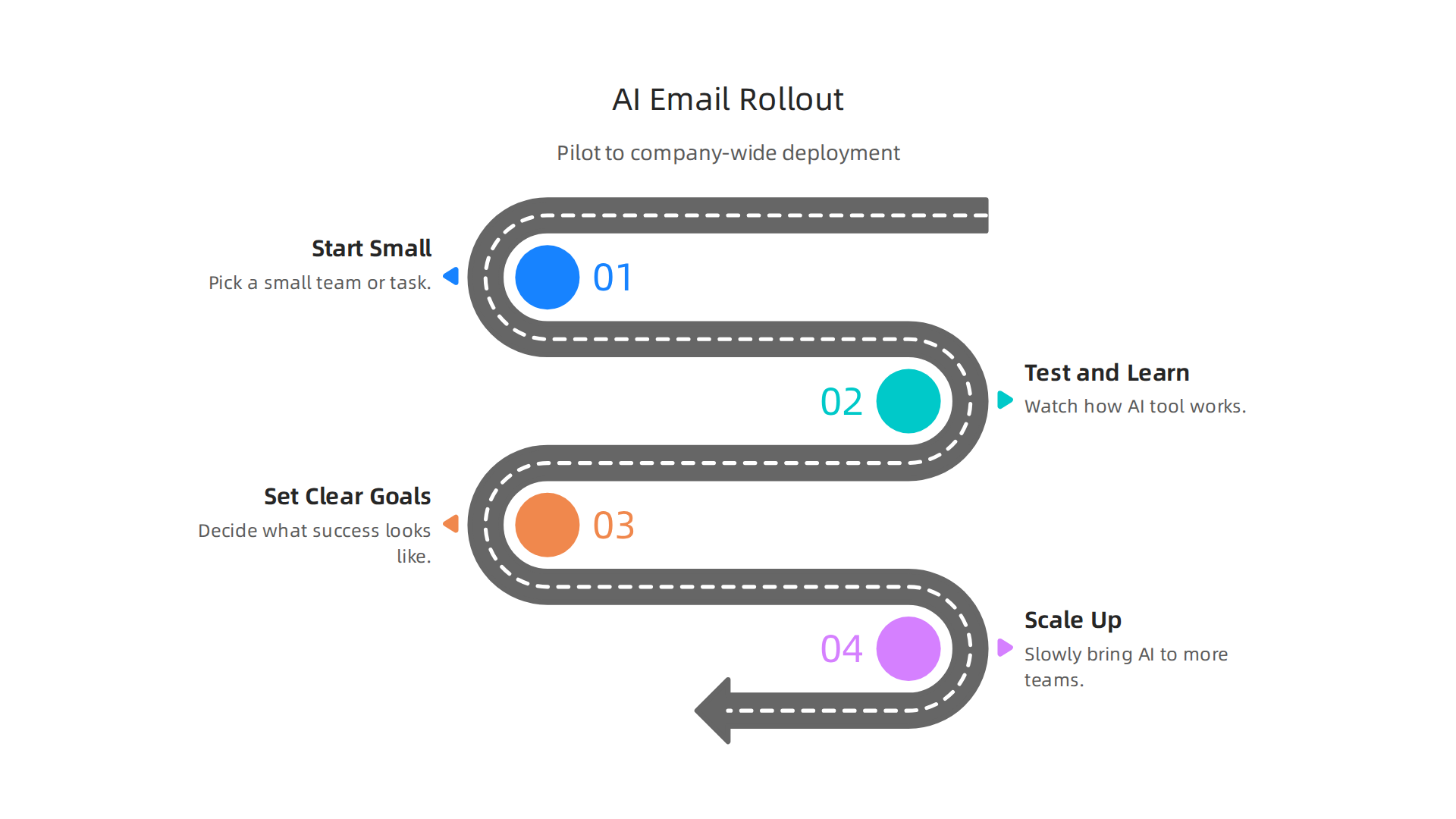
- Start Small: Pick a small team or a specific task where an AI tool for email writing can help. This might be a customer service team or a group that sends many similar messages.
- Test and Learn: Watch how the AI tool works. Does it save time? Does it make emails better? Are employees happy with it? This stage helps you learn what works and what doesn’t before you spend a lot of money or change how everyone works.
- Set Clear Goals: Before you start, decide what success looks like. For example, you might want to reduce the time spent writing business email by 30%, or get more replies from customers. These are your "success checkpoints."
- Grow Step by Step: If the pilot goes well, you can slowly bring the AI tool to more teams or for more uses. This way, you can fix problems as they come up and make sure everyone gets the training they need. Many companies find AI email assistants help improve response times significantly, sometimes by 34-47% in customer-facing roles AI Email Management Statistics 2026.
Choosing the Right AI Email Tools
When it’s time to buy AI tools for your business email, you’ll need a list of things to look for. Beyond security, which we talked about earlier, here are other key points:
- Ease of Use: How simple is the tool for your employees to learn and use every day? A good AI email writer free or paid should fit easily into your current work.
- Integration: Does it work well with the email systems you already have, like Gmail or Outlook? Many top AI email tools in 2026 are built to connect smoothly with popular platforms The 7 Best AI Email Tools in 2026.
- Features: What can the AI tool actually do? Does it just fix grammar, or can it draft full messages, summarize long email chains, or even suggest replies? Look at different options, from an [ai letter writer free online] to more advanced paid versions.
- Support and Training: Will the company selling the AI tool help you and your team learn how to use it? Good support can make a big difference.
Who’s in Charge? Team Structures and Rules
Using AI tools for email means you need a clear plan for who does what. This is called "governance."
- Designated Leader: Someone needs to be in charge of how AI is used for business email. This person helps choose tools, sets the rules, and makes sure everyone follows them.
- Training Programs: Employees need to know how to use the AI tools correctly and responsibly. Training should cover not just how to click buttons, but also how to review AI-generated content to ensure it sounds human and fits the company’s message.
- Policy Guidelines: Create clear rules on how AI should be used for email. For example, should AI always get a human review before sending? How should sensitive information be handled, even if the AI suggests it? These policies protect your company and your customers.
- Regular Checks: It’s important to regularly check how the AI tools are working and if they are still meeting your goals. Technology changes fast in 2026, so your plans might need to change too.
By thinking through these steps, from pilot programs to choosing tools and setting up clear team roles, your business can use AI for email writing in a smart and helpful way. If you want to dive deeper into how companies are successfully using AI, explore more about Artificial Intelligence Applications in 2026.
Summary
This article explains why AI for business email has become a strategic priority in 2026, showing how automation, summarization, and prioritization save time and improve outcomes across teams. It covers the main AI features—smart drafts, reply suggestions, digests, automated follow-ups and intent classification—and explains practical use cases for sales, customer support, and executives. The piece outlines how companies adopt AI gradually, how to measure ROI with before/after checks and A/B tests, and real-world case studies that show time and revenue gains. It also walks through security, compliance and data-privacy considerations such as encryption, data residency and consent, plus vendor questions to ask. Finally, the article gives a step-by-step approach to piloting, scaling, governance, and change management so you can choose the right tools and roll them out safely. After reading, you’ll know which features matter, how to evaluate vendors, how to measure impact, and what policies to set for secure, practical adoption.