Introduction: Why Free AI Tools Are Reshaping the Classroom
The classroom is changing fast. By 2026, nearly all students use AI in some way. In fact, recent data shows that 88% of students now use AI tools, and 69% of teachers say AI has improved their teaching methods. Teachers who use AI regularly save the equivalent of six weeks per school year. That’s a huge win for everyone.
But here’s the thing: there are so many tools coming out every week. It’s easy to feel overwhelmed. You might wonder which ones are actually helpful and won’t drain your budget.

That’s exactly why this article exists. We’ve done the research to bring you the best ai tools for teachers free in 2026. No guesswork, just practical options you can start using today.
If you’re new to using AI in your classroom, you might also want to check out how to humanize AI text with proven techniques. It’s a handy skill when you create lesson materials or student feedback.
The goal here is simple: cut through the noise and give you a clear, evidence-based roundup of tools that reduce your workload and improve learning outcomes. Ready to dive in? Let’s start with what you need to know.
For teachers who want to stay ahead of the curve without spending hours researching, signing up for a daily digest like The Deep View Newsletter can help you keep learning about AI trends in just a few minutes each day.
1. AI-Powered Lesson Planning Assistants
You know that feeling. It’s Sunday night, and you still need to plan five different lessons for the week. That used to take hours. But here’s the good news: free AI tools can now handle most of that work in minutes.
Tools like MagicSchool Free let you type in your topic, grade level, and standards.

ps://weblish-public.s3.us-east-1.amazonaws.com/1780088784489_528597.png)
In seconds, you get a full lesson plan with activities, assessments, and even differentiation ideas. One source says MagicSchool Free covers over 80 teacher tools on its free plan. That’s a lot of help without spending a dime.
Other free options include tools from Edcafe AI and Taskade. These tools use large language models to suggest different activities for different learners. Want a version for your advanced students and a simpler one for those who need more support? Just ask. The AI does the heavy lifting.
Teachers who use these tools report saving 30 to 50 percent of their planning time. That means more time for actually teaching, grading, or just taking a breather. Some tools also offer features like generating quizzes, rubrics, and even slide decks. So you get a complete set of materials.
If you want your AI-created lessons to sound more natural, you might like our guide on the top content humanization tools. It shows you how to tweak AI text so it sounds like you wrote it.
The bottom line: free AI lesson planners are a game changer. They cut your workload and let you focus on what really matters: your students. Want to stay on top of the latest AI tools and trends? Try The Deep View Newsletter. It sends you clear updates every day, so you never miss what’s new in AI for your classroom.
2. Automated Grading and Feedback Tools
Now that you have your lessons planned, what about the grading pile? If you’re like most teachers, marking essays and short answers eats up hours each week. Here’s some relief: free AI tools for teachers can now handle much of that work for you.
AI grading tools use smart algorithms to evaluate student work quickly. They check essays, short answers, and even coding assignments. The best part? They give consistent feedback every time. According to The School House, these tools provide objective grading based on customizable rubrics, so you can trust the scores.
Several free options are already available in 2026. For example, EssayGrader offers free grading for up to 25 essays per month.
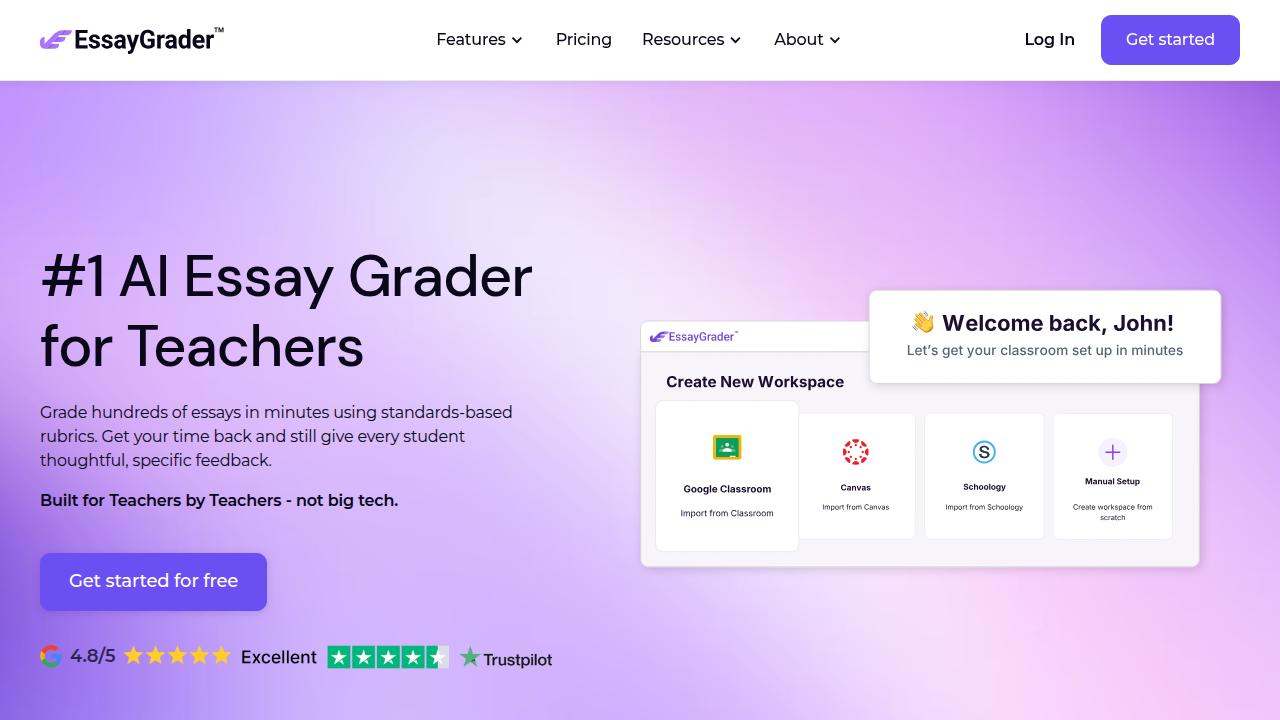
Tools like CoGrader and the Lernico AI grading tool also have free plans that let you upload student work, paste your rubric, and get scores with detailed comments in minutes. That means you can go from hours of grading to just minutes.
How much time can you actually save? Research shows that teachers who use AI grading tools reduce grading time by up to 40%. Some tools even claim an 80% reduction. Imagine what you could do with that extra time. You could focus on lesson planning, one-on-one student support, or just catching your breath.
The key is to use these tools as a first pass. You still review the feedback, but the heavy lifting is done for you.

This works well for formative assessments where students need quick, consistent feedback to improve.
If you want to make sure the AI-generated comments sound natural and helpful, check out our guide on how to humanize AI text with proven techniques. It shows you how to tweak AI output to match your voice.
The bottom line is clear. Free AI grading tools can seriously cut your workload. You get more time for your students and less time buried in papers.
Want to stay ahead of the latest AI tools for classrooms and beyond? Try The Deep View Newsletter. It delivers clear daily updates straight to your inbox, so you never miss what’s new in AI.
3. AI for Personalized Learning Pathways
Grading is faster now. But what about the real challenge in your classroom? Every student learns at a different speed. Some pick up new ideas quickly. Others need more practice. Free AI tools for teachers now help you give each student exactly what they need.
How adaptive learning works
Adaptive learning platforms use AI to watch how a student performs. If a student masters a topic, the tool moves them ahead. If they struggle, it gives them more practice or a different explanation.
This happens automatically behind the scenes. You don’t have to create three versions of the same lesson anymore.
These tools use the elements of AI like machine learning and natural language processing to figure out where each student is. Some even use games artificial intelligence to turn practice into fun activities. Students might solve math problems in a video game setting or earn badges for mastering reading skills. This keeps them engaged without you having to design each activity.
What the research shows
Studies find that personalized AI tutoring can improve student outcomes by 15 to 25 percent in math and language arts. That is a big jump. It means more students stay on track and fewer fall behind. For you, it means less time spent reteaching the same concepts and more time helping students who really need you.
Free options in 2026
Several platforms offer robust free versions in 2026. You can set up personalized learning pathways for each student without paying a dime. These ai tools free for students let them work at their own pace while you get reports on their progress. You see at a glance who needs help and who is ready to move on.
Making it feel human
The AI generates content and feedback automatically. Sometimes it can sound a bit robotic. That is where you come in. You can review and adjust the messages so they sound like you. If you want tips on keeping the language warm and natural, check out our guide on how to humanize AI text. It shows you simple ways to make AI output match your teaching voice.
Your next step
Personalized learning pathways are one of the most powerful ai tools for teachers free in 2026. They save you time and help every student succeed. To keep learning about the latest AI tools for your classroom, subscribe to The Deep View Newsletter. It delivers clear daily updates so you always know what is new and useful.
4. AI-Driven Content Creation for Classrooms
Personalized learning is powerful, but you still need the actual materials. Worksheets, quizzes, reading passages, and even short videos take hours to build from scratch. In 2026, free ai tools for teachers free can handle that load for you. You just pick a topic, and the tool generates classroom-ready content in seconds.
What these tools can do
Imagine typing "volcanoes for third grade" and getting a reading passage, a 10-question quiz, and a vocabulary list. That is exactly what these platforms offer. Some even create multimedia content like short explainer videos or audio clips. You can adjust the reading level, add images, or change the format. Platforms like MagicSchool include over 80 different teacher tools in their free plan, as highlighted in a review of the best AI lesson planners for 2026 from Forasoft. Another great option is Brisk Teaching, which works right inside Google Docs and Slides so you don’t have to switch tabs.
How much time you save
Teachers who use AI for content creation report saving 10 to 15 hours per week on material preparation. Think about that. That is two full workdays every week that you can spend actually teaching, planning hands-on activities, or grading. A roundup from Ditch That Textbook lists 50 different AI tools for educators, many with generous free versions see the full list. You can try several and pick what fits your style.
Keeping it natural
AI generates content fast, but sometimes the language feels flat. For example, a reading passage might use sentences that are all the same length or words that don’t sound like you. The good news is you can edit it. If you want to make that AI text warmer and more conversational, check out our guide on how to humanize AI text. It shows simple tweaks that keep your teaching voice front and center.
Your next step
AI-driven content creation is one of the best time savers among the ai tools for teachers free today. It lets you focus on students instead of paperwork. To discover new tools as they come out, subscribe to The Deep View Newsletter. It delivers clear daily updates so you always know what is useful in your classroom.
5. Free AI Tutoring and Homework Help Tools
Picture this. It is 10 PM, and one of your students is stuck on a math problem. Their parents are asleep. The textbook explanation is confusing. In 2026, that student does not have to wait until morning. They can open a free AI tutor and get help right away.

24/7 academic support
AI chatbots and tutors now offer round-the-clock help across almost every subject. These tools work like a patient teacher who never gets tired. You ask a question, and the AI explains it step by step. According to an overview of the top AI tools for students in 2026 from OHSC, these platforms cover everything from math to essay writing see the full list. Another resource shows that ChatGPT-5 acts as a personal tutor, generating mock tests and answering clarifying questions read the Eklavvya breakdown.
Aligned with real curricula
The best part is these tools are not generic. Many of them follow standard school curricula. A subject-by-subject guide from Tutor AI breaks down the top 12 homework solvers for 2026, showing which ones align with common math, science, and writing standards check the breakdown. So the help a student gets matches what they are learning in class.
Building real skills
Here is the thing. Using AI tutors does not make students dependent on them. Data shows the opposite. Students who use AI tools independently actually improve their problem-solving skills. They learn to ask better questions and work through difficult concepts on their own. Some of these tools even turn learning into a game, which makes the whole experience more fun. The world of AI is full of creative approaches, including the rise of games artificial intelligence that keeps students engaged. You can see how these trends are reshaping the industry in our report on the state of the artificial intelligence game industry in 2026.
Stay in the know
These free tutors are among the most valuable ai tools for teachers free because they lighten your workload too. Your students get the help they need, and you spend less time answering the same questions over and over. To keep up with new tools as they appear, subscribe to The Deep View Newsletter. It delivers clear daily updates so you always know what is working in classrooms right now.
6. AI Tools for Accessibility and Special Education
Now imagine a different student. This one has a vision impairment that makes reading a textbook nearly impossible. Or a student with dyslexia who struggles to decode every sentence. Or a student who is deaf and cannot hear the video you just played in class.
For years, these students needed expensive software, special hardware, or one-on-one support just to access the same lesson as everyone else. That is changing fast in 2026. Free AI tools are now removing those barriers.
Speech, sight, and sound support
Free AI tools give students with disabilities powerful ways to learn. Speech-to-text lets a student speak an answer instead of typing it. Text-to-speech reads any on-screen content out loud. Real-time captioning shows spoken words as text during a video lesson. Reading assistance tools highlight and define words as a student reads.
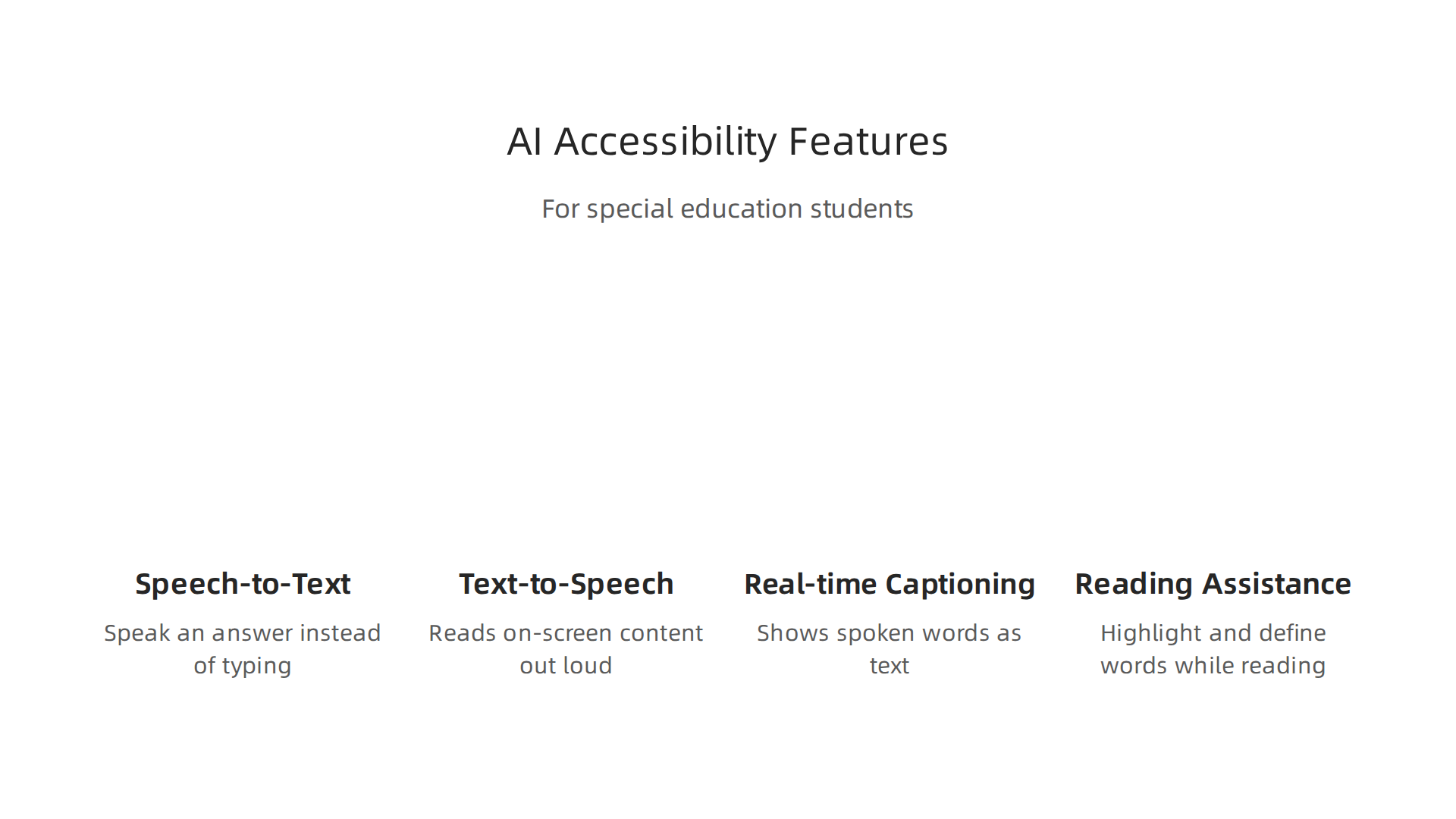
These are not experimental features anymore. They are built into tools that are free for schools and students. The list of top free AI tools for students now includes several that focus on accessibility see the OHSC roundup. And because many of these tools are designed with standard curricula in mind, they match what students are actually studying check the curriculum-aligned options.
Real results in real classrooms
Here is the data that matters most. School districts that use AI accessibility tools are seeing higher engagement from their special education students. Test scores are going up too. When students can access the same material in a way that works for them, they participate more and learn more.
Tools like ChatGPT-5 act as patient tutors that explain concepts in multiple ways, which is a game changer for students who need repetition or different phrasing read the Eklavvya breakdown. And the best part is these tools are free. They are among the most valuable ai tools for teachers free because they reduce the need for expensive accommodations while giving every student a fair chance.
A note on making AI work for everyone
One important thing to remember is that AI tools work best when they are set up with the user in mind. You can learn more about tailoring AI outputs for different needs in our guide on how to humanize AI text with proven techniques read the guide.
Stay ahead of the curve
New free accessibility tools are appearing every month. To know which ones actually work and how other teachers are using them, subscribe to The Deep View Newsletter. It delivers simple daily updates so you never miss a tool that could change a student’s life.
7. AI for Classroom Management and Engagement
You know that feeling. You are in the middle of explaining an important concept, and three students are staring out the window. One is drawing. Another is whispering. You lose your flow, and the lesson suffers.
Managing a classroom full of different personalities is one of the hardest parts of teaching. But here is some good news for 2026. Free AI tools can now help you keep everyone focused without you having to become a referee.
Tools that watch, suggest, and gamify
Some of the best ai tools for teachers free are designed for classroom management. They monitor participation in real time. They track who is answering questions, who is zoning out, and even who is getting frustrated. Then they suggest what to do next. For example, a tool might prompt you to call on a quiet student or offer a quick brain break for a restless group.
A tool like Edcafe AI does exactly this. It analyzes engagement patterns and gives you gentle nudges. You can see which parts of your lesson lose attention and adjust on the fly. Other free options let you turn a worksheet into a game. Points, levels, and instant feedback make learning feel like play. The result is a calmer room where students actually want to participate.

According to a 2026 roundup of top AI classroom tools, these free resources are already boosting participation and cutting down on disruptions for many teachers see the GradeWithAI list. The same tools also handle routine tasks like taking attendance or tracking behavior trends, which frees up your energy for teaching.
Why gamification works
Gamification is not just about fun. AI makes it smarter. The technology adapts the game to each student’s skill level. A struggling student gets easier challenges and more encouragement. A fast learner gets harder puzzles. Everyone stays in the zone of productive learning. This is one area where games artificial intelligence shines. If you want to understand how AI powers engagement in game-like systems, check out our piece on the state of the artificial intelligence game industry in 2026.
The real payoff
Teachers who use these free management tools report a real shift. Disruptive behaviors drop. Students raise their hands more. And you, the teacher, spend less time policing and more time actually teaching. A few minutes of setup at the start of the year can save you hours of frustration later.
Stay ahead of the curve
New free classroom management tools are appearing every month. To know which ones actually work and how other teachers are using them, subscribe to The Deep View Newsletter. It delivers simple daily updates so you never miss a tool that could make your classroom run smoother.
8. AI for Professional Development and Training
You are a teacher, not an AI expert. But by 2026, many school districts now expect you to know the basics of AI literacy. It can feel like just one more thing on your plate.
Here is the good news. Free AI platforms are now making professional development easier than ever. They create personalized learning paths just for you. You do not sit through one-size-fits-all workshops anymore. Instead, the AI figures out what you already know and what you still need to learn. It then serves you bite-sized lessons, videos, and hands-on activities.
Micro-credentials at no cost
Some of the best ai tools for teachers free now include built-in training modules. Tools like Edcafe AI offer micro-credentials you can earn by completing short guides on lesson integration. These are not boring certificates. They are practical badges that show you can actually use AI in your classroom. According to a 2026 guide on free tools for teachers, many educators are using these resources to build confidence without spending a dime check the Koalendar list.
Why AI literacy matters more now
School districts across the country are making AI training a requirement. The reason is simple. When teachers understand the elements of ai, they can use it safely and effectively. They know when to trust the output and when to double-check. They also know how to teach students about responsible AI use. If you want to see how AI is changing other industries too, read our article on how videos on artificial intelligence can help you master AI in 2026.
Your next step
Continuous learning does not have to be hard. These free tools fit into your schedule. You can learn during lunch, during prep time, or even on your commute. The key is to start small and keep going.
Want to stay updated on the latest AI tools and training tips for teachers? Sign up for The Deep View Newsletter. It gives you clear, daily updates so you never fall behind.
Summary
This article is a practical 2026 roundup of the best free AI tools teachers can use to save time and improve student outcomes. It covers tools for automated lesson planning, grading and feedback, personalized learning pathways, content generation, 24/7 tutoring, accessibility support, classroom management, and teacher professional development. The piece explains how these tools cut workload—often saving hours or weeks per year—while boosting consistency and engagement, and it highlights real free options like MagicSchool Free, Edcafe AI, EssayGrader, and Brisk Teaching. You’ll learn how to use AI as a first pass (not a replacement), how adaptive systems personalize learning, and why accessibility features matter. The article also stresses simple ways to humanize AI output so materials sound like you, and points you to ongoing resources to keep up with new tools and trends.